Meraki firewalls tend to do well for businesses of all sizes. However, this is the same thing that can make it challenging to make the right choice for your business.
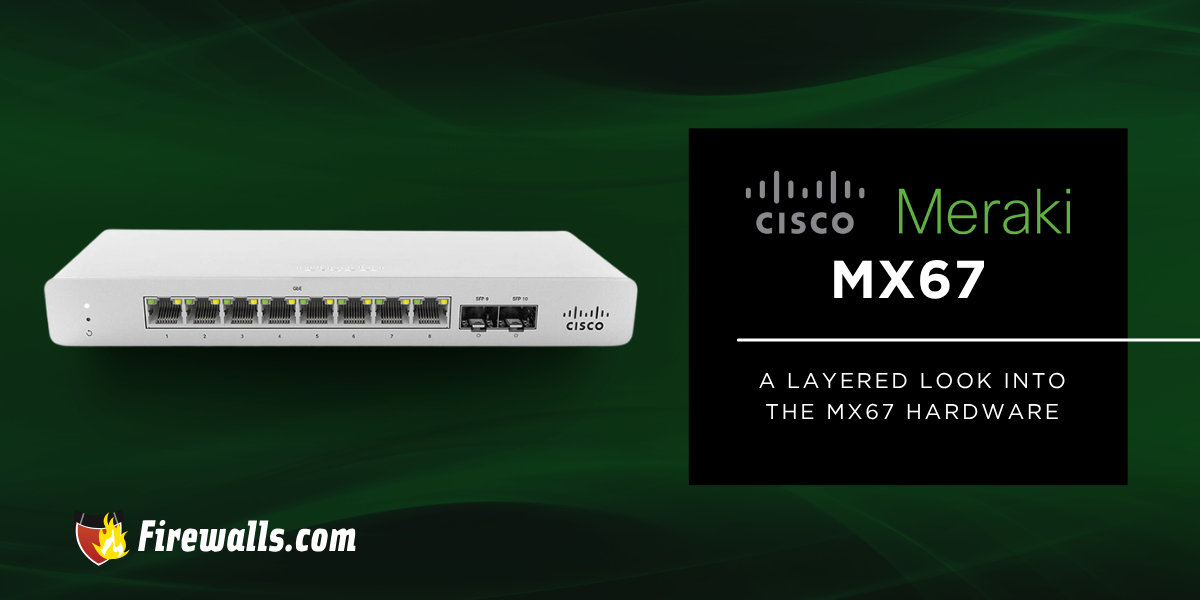
More specifically, looking at the MX67 in this case, you’re looking at a firewall that Meraki made for small businesses and distributed networks. In this article, I’ll focus on the most important details about the firewall so you can efficiently compare it against your real-world network demands.
Key Takeaways:
- The Cisco Meraki MX67 is built for small branch networks with 36-50 user support
- It delivers 450 Mbps firewall throughput and 200 Mbps VPN performance
- Includes Layer 7 security, SNORT IPS, and Advanced Malware Protection
- Built-in SD-WAN features improve routing, failover, and site-to-site connectivity
- Fully cloud-managed through the Meraki Dashboard with zero-touch deployment and remote control
What is the Cisco Meraki MX67 Firewall?
A popular cloud-managed firewall solution, the MX67 is specifically built with small branch environments in mind. Due to its performance, it’s considered to be a leading choice for small businesses.
Here’s a quick overview of what you’re getting out of the MX67:
- Supports approximately 36 to 50 users
- Enables zero-touch provisioning and centralized dashboard control
- Secure connectivity is improved with the help of SD-WAN features
- Includes 450 Mbps stateful firewall throughput
- VPN performance supports up to 200 Mbps throughput

Although it’s one of many out of the Cisco Meraki MX series, it’s one that makes a statement for small businesses that need long-term support. Meraki products do a good job of selling themselves on the surface, but I always highlight the specs and features, as these will be some of your biggest decision-makers.
Cisco Meraki MX67 Hardware Specifications
For starters, I always make a point to highlight that the MX67 operates as a low-power desktop or wall-mount device. This doesn’t mean it won’t get the job done, but it’s made for easy management and deployment.
The specs somewhat follow the same path, offering modest yet effective capabilities and features. For better context on the MX67, you can see exactly what it’s capable of from many angles in the table below.
| Specifications | Cisco Meraki MX67 |
|---|---|
| Firewall Throughput | 450 Mbps |
| Advanced Security Throughput | 300 Mbps |
| Max VPN Throughput | 200 Mbps |
| Max Concurrent VPN Tunnels | 50 |
| WAN Interfaces | 1 x GbE RJ45 1 x USB (cellular failover) 1 x GbE RJ45 (dual-purpose) |
| LAN Interfaces | 4 x GbE RJ45 |
Now, keep in mind this is the gist of what you’re getting into here. These are the leading specifications for Meraki firewall models. However, like all other models in their lineup, the MX67 packs more of a punch than the specs make it seem.

Leading Security Features of Cisco Meraki Firewalls
Through a layered, cloud-managed approach, the MX67 focuses on integrated threat prevention and traffic control. Better yet, the Cisco Meraki MX series combines multiple security engines.
This includes the likes of stateful firewalling, Cisco SNORT intrusion prevention, and Advanced Malware Protection (AMP). There’s a lot to unpack here, so I’m going to focus on the security features companies and IT teams need to know about.
Layer 7 Security and Threat Protection
Making use of stateful firewall inspection and Layer 7 visibility, the MX67 comes with the promise of deeper traffic analysis. It’s able to identify apps and behaviors that go beyond the traditional port-based filtering.
Moreover, with the help of Cisco SNORT intrusion prevention, known threats get blocked by using real-time signature detection. For those needing identity-based policies and geo-IP rules, the MX67 is a reliable option.
Built-In SD-WAN and VPN
The SD-WAN capabilities in this firewall work to optimize your traffic routing across multiple WAN links. On top of that, the policy-based routing is what allows traffic control, solely based on application or business rules.
With auto VPN being a part of the equation, it simplifies secure site-to-site connectivity with automated IPsec tunnel setup. I can’t forget to mention the load balancing here either, as this distributes traffic across available connections, leading to improved overall performance.
Application-Aware Traffic Control and Content Filtering
Through Layer 7 traffic shaping, your business-critical apps get prioritized, while limiting non-essential traffic. Admins can also restrict high-bandwidth apps like streaming or peer-to-peer services.
I’d also like to point out here that the CIPA-compliant filtering supports regulated and educational environments. Add on the identity-based controls, and you’ll be able to apply rules based on user and device for consistent enforcement.
Cloud Management Benefits of the Firewall Meraki Platform
With the help of the Meraki Dashboard, the MX67 makes sure you always have centralized cloud-based network management. The admin side of things can manage firewall, SD-WAN, and security settings, all from a single interface.
Here are a few other core benefits of cloud management to keep in mind:
- Provides full visibility into network activity across distributed locations
- Zero-touch deployment allows devices to be preconfigured
- Automatically provisions once connected to the internet
- Network monitoring tools deliver real-time insight into users, devices, and app usage
- Role-based administration supports controlled access for different IT team members
There’s a lot to appreciate here, even if the MX67 is on the smaller side of the firewall scale. I always like to remind organizations that they always have room to scale. Choosing the right firewall is a crucial decision, but that doesn’t mean you can’t seamlessly make a switch when the time comes.
Then again, you also don’t have to navigate business network security all on your own. For many organizations, the help of managed services takes a ton of the stress off making the right choice, managing it, and upgrading down the road.

Final Thoughts
When it comes down to Meraki firewalls, the MX67 is a popular choice for small, yet growing organizations. Scalability is no issue here, and it comes with the promise of strong core performance and cloud-based management.
Not only is choosing the right firewall important, but the vendor you work with has a lot of effect on the long-term support you need. For those wondering where to buy Meraki products, our team at Firewalls.com can put you in front of exactly what you need. Get your network up to speed by working with those who understand more than just the hardware.
Frequently Asked Questions
How Many Users Can the Cisco Meraki MX67 Support?
The MX67 is recommended for small branch environments supporting roughly 36 to 50 users.
What is the Firewall Throughput of the MX67?
It delivers up to 450 Mbps stateful firewall throughput for everyday business traffic.
Does the MX67 Support SD-WAN Features?
Yes, it includes built-in SD-WAN with Auto VPN, policy-based routing, and load balancing.
What Types of Security Features are Included?
The firewall includes things like Layer 7 inspection, Cisco SNORT intrusion prevention, Advanced Malware Protection, and content filtering, to name a few.
Can the MX67 be Managed Remotely?
Most definitely, and it’s fully-cloud-managed through the Meraki Dashboard. This supports things like remote configuration, monitoring, and zero-touch deployment.