In the world of network security solutions, SonicWall switches are a fan favorite for many organizations, and this is for many reasons. Outside of the fact that we’re talking about a highly trusted manufacturer here, SonicWall does well to offer something for businesses of all sizes.
SonicWall products come with a long list to sort through, but in the realm of network switches, you have a small yet scalable selection to choose from. This article highlights several network switch models from SonicWall that cater to the needs of any size business.
Key Takeaways:
- Switches from SonicWall deliver scalable connectivity for organizations of all sizes and growth stages
- Compare SonicWall models based on port options, PoE support, and deployment
- PoE switches simplify installation for access points, cameras, phones, and more
- Desktop and rack-mounted options support various network environment demands
- Choosing the right network switch requires careful internal review of security demands and future growth expectations
Why SonicWall Switches are a Smart Choice for Your Business Network
At their core, SonicWall switches easily provide secure and scalable connectivity solutions. Moreover, they operate at the access layer, working to connect endpoints like computers, wireless access points, and more. Before we take a deeper look into some of the best network switches from SonicWall, check out the table below for a brief overview.
| Specification | SonicWall Switch 12-8 | SonicWall Switch 12-10-FPoE | SonicWall Switch 14-24 FPoE | SonicWall Switch 14-48-FPoE |
|---|---|---|---|---|
| Ethernet Ports | 8 Gigabit Ethernet | 10 Gigabit Ethernet | 24 Gigabit Ethernet | 48 Gigabit Ethernet |
| Total Interfaces | 10 | 12 | 28 | 52 |
| PoE Support | None | Full PoE | Full PoE | Full PoE |
| SFP/SFP+ Uplinks | 2 SFP | 2 SFP | 4 SFP+ | 4 SFP+ |
| Switching Capacity | 20 Gbps | 24 Gbps | 128 Gbps | 176 Gbps |
| Memory | 256 MB | 256 MB | 512 MB | 512 MB |
| Packet Buffer | 512K | 512K | 1.5 million | 2 million |
| Form Factor | Desktop | Desktop | Rack Mount | Rack Mount |
As you can see from these SonicWall models alone, it all scales as you go through the entire lineup. Not only is this great for businesses just starting out, but you’re guaranteed years of scalable support regardless of which model you start with. To know which one really applies to your real-world network demands, it helps to get to know the solutions a little better.

What is the SonicWall Switch 12-8?
Praised for its compact form factor, the SonicWall Switch 12-8 focuses on simplicity and security over anything else. It’s desktop-ready, making it a reliable choice for smaller offices or space-conscious deployments in general.
Here are a few unique details to keep in mind about this networking switch:
- PoE Support: Does not include PoE functionality
- Ethernet Ports: Features 8 Gigabit Ethernet ports
- SFP Uplinks: Includes 2 SFP uplink ports
- Switching Capacity: 20 Gbps
- Memory: 256MB
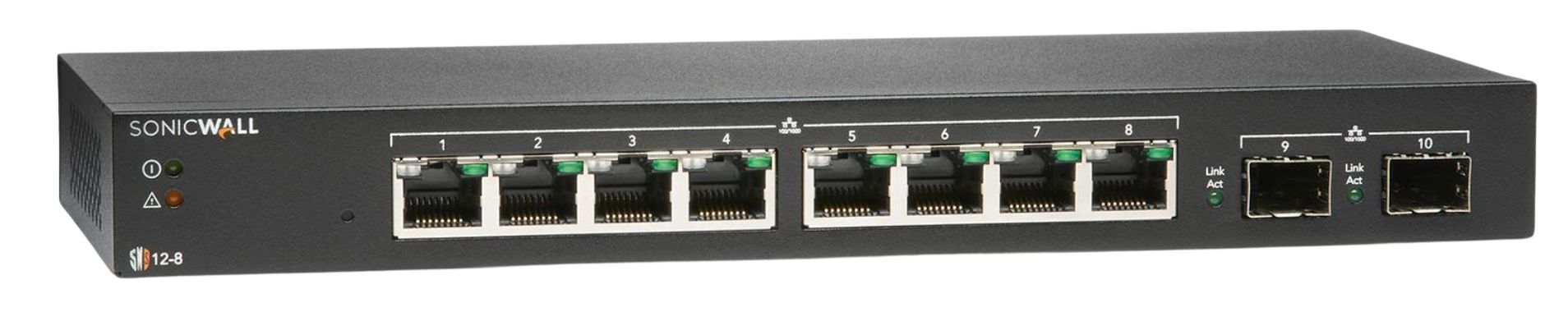
You’ll also benefit from the built-in management features, which support VLANs, traffic management, and more. Overall, the Switch 12-8 from SonicWall is your entry-level start, perfect for organizations just getting started with their security stack.
What is the SonicWall Switch 12-10-FPoE?
Taking a step up from the previous model, the 12-10-FPoE comes with network switch PoE support. More specifically, this particular model is aimed at growing companies that are expecting to continue to scale.
Below are some of the unique specs that set this model apart from the rest:
- PoE Support: Full PoE support with 802.3af/at standards and up to 130W of PoE power
- Ethernet Ports: Includes 10 Gigabit Ethernet ports
- SFP Uplinks: Comes with 2 SFP uplinks
- Switching Capacity: 24 Gbps
- Memory: 256 MB
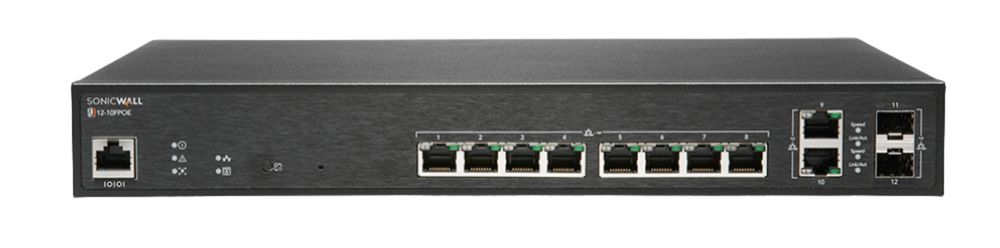
Clearly a big differentiator with this model from the 12-8 is the full PoE capabilities. However, you’ll also come across similarities like VLAN support, Layer 2 networking, and so on.
What is the Networking Switch 14-24 FPoE from SonicWall?
When it comes to the 14-24 FPoE SonicWall switch, you’re dealing with a rack-mounted solution. This is one that’s built for the needs of mid-sized organizations and the needs of branch office environments.
Here’s what the specs have to say about it:
- PoE Support: Full PoE support with 802.3af/at standards
- Ethernet Ports: Includes 24 Gigabit Ethernet ports
- SFP Uplinks: Features 4 SFP+ uplinks
- Switching Capacity: 128 Gbps
- Memory: 512 MB

It’s a great option for already structured IT environments due to its rackmount design. In addition to that, those working in scaling environments can still lean on years of support from this model.
What is the 14-48-FPoE SonicWall Switch?
The strongest option in this list, the 14-48-FPoE network switch from SonicWall definitely has more than the basics covered. It’s an enterprise-focused model, perfect for high-density network environments.
Check out what the specs have to say below:
- PoE Support: Full PoE support with 802.3af/at standards and up to 740W of PoE power
- Ethernet Ports: Includes 48 Gigabit Ethernet ports
- SFP Uplinks: Comes with 4 SFP+ uplinks
- Switching Capacity: 176 Gbps
- Memory: 512 MB

The combined approach with high switching performance and expanded port capacity is what makes this model such a powerhouse. Although it’s a bit much for newer organizations, it’s one of the best SonicWall switches for those on a strong growth trajectory at the enterprise level.

How to Choose the Right SonicWall Switches for Your Business
Making the right choice when sorting through the best network switches requires a pretty careful evaluation. Individual specifications are one thing, but landing the right switch model also demands a thorough understanding of your current and future network demands. If you want to make sure you end up making the right choice, go through each of the steps listed out below.
- Determine how many users, endpoints, and connected devices your network needs
- Match your switch port count to the number of devices that need wired connections
- Consider whether your network needs PoE support or not
- Review how much traffic your network deals with and whether you’ll need additional bandwidth
- Lean into a SonicWall switch that integrates with your existing security stack and network demands
A little hindsight is needed on top of this, as it helps to have an idea of where you expect the company to be in a few years. Moreover, you can always work alongside the experts on this matter to help you gauge your choices. Having professional help on the backend can help you, IT teams, and the whole organization stay on track and avoid trial and error.
The Bottom Line
SonicWall switches are known to deliver scalable network infrastructure that’s fitting for companies of all sizes. On the surface, different SonicWall models will always come with varying specs and niche capabilities.
The switch models listed in this article range from small to large. Whereas the 12-8 switch is great for smaller operations, jumping to the 14-48-FPoE is for much larger businesses. Our team at Firewalls.com is here if you ever need help navigating your company’s security stack. Don’t wait to hit us with any questions you might have along the way.
Frequently Asked Questions
What are SonicWall Switches Used For?
Their network switches connect devices while helping businesses manage traffic, segment networks, and expand infrastructure securely.
Which SonicWall Switch is Best for a Small Business?
The SonicWall Switch 12-8 is the go-to for this category, especially due to its reliable connectivity and compact form factor.
What is the Difference Between PoE and non-PoE Support?
PoE SonicWall switches can power devices like WAPs, VoIP phones, and computers, while non-PoE models focus on standard connectivity support.
Can SonicWall Switches Work With Their Firewalls and Wireless Solutions?
Yes, their network switches integrate with SonicWall firewalls and wireless solutions to provide a centralized experience that’s easy to manage and unified.
Which SonicWall Switch is Best for Larger Organizations?
The 14-48-FPoE switch would fall under this category, as it’s built for high-density environments, which can be seen in its 48 Gigabit Ethernet ports and full PoE support.